Anti Leak Texturepack
A lightweight, resource pack that hides bedrock, ores, spawners, and other "leaking" blocks so your base and farms can't be spotted on camera. Mostly used on Donutsmp / HugoSMP
Описание
Magic Anti Leak
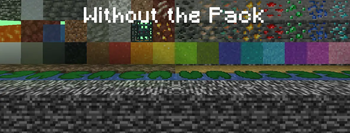
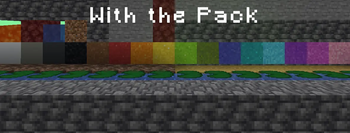
Stop your base, your ores, and your farms from showing up on camera. Magic Anti Leak is a lightweight, no-mod-required resource pack that flattens every "leaking" block in your world down to plain stone, deepslate, or dirt - so screen recordings, clips, and stream snipers can't read your base layout, ore veins, or spawner farms just by looking at your screen.
What's new in 5.3
- Grass coordinate exploit fixed - Minecraft nudges grass, flowers and other plants a few pixels sideways based on their exact world coordinates. With just 5-6 grass tufts in a screenshot, someone could calculate where you are. Every plant that gets this offset is now invisible.
- Random block rotations fixed -
grass_block,red_sand,mycelium,sculk,fire, andsoul_fireno longer pick a random rotation or texture variant based on their position, so they can't be traced back to coordinates either.
What it hides
- Bedrock - disguised as
deepslate, so the bottom of the world doesn't give away your depth. - Compass & Recovery Compass - the needle is removed completely and replaced by a fixed, centered
X. The X never moves, no matter where you look, so nobody can read the direction to find your base. Lodestone compasses are covered too. - Grass coordinate exploit - every plant that Minecraft shifts based on its world coordinates is invisible:
short_grass,tall_grass,fern,large_fern, all flowers (including tall flowers, eyeblossoms and the pitcher plant),bamboo,pointed_dripstone,hanging_roots,mangrove_propagule,small_dripleaf, nether roots and sprouts, dry grass and bushes. They still show normally in your inventory. - Random block rotations -
grass_block,red_sand,mycelium,sculk,fire, andsoul_firealways look the same, everywhere. - All ores -
coal,iron,copper,gold,redstone,lapis,diamond,emerald, and both nether ores, including everydeepslatevariant. All of them blend into their surrounding stone. - Odd stone types -
andesite,diorite,granite,tuff, andend_stoneare normalized to plain stone so terrain doesn't hint at depth or biome. - Mob spawners - blended into stone so farm locations can't be spotted at a glance.
- Dirt variants -
coarse_dirt,mycelium,podzol, androoted_dirtall read as plain dirt, so unusual dirt types can't be used to guess your biome or base entrances. - Gravel, clay, and tuff - reworked with natural texture variation so they don't tile in an obviously "disguised" way.
- Grass, foliage, and water color - fixed to a constant color instead of the normal biome tint, so your surroundings can't be used to narrow down your location.
- Clouds - made fully transparent, so cloud height and position can't be used to estimate your build altitude.
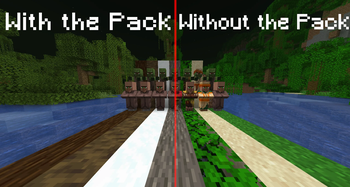
- Villagers and zombie villagers - every biome variant (
desert,jungle,savanna,snow,swamp,taiga) uses the same plain default look, so a village's biome can't be guessed just from the villagers standing in it. - Concrete powder, soul sand, dirt paths, and lily pads - locked against other resource packs applying detectable randomized variants to them, so combined packs can't accidentally give away a disguised block.
Why it matters
On anarchy-style servers, a single frame from a stream or clip can be enough for someone to identify your biome, your depth, or the shape of a farm. Magic Anti Leak closes those visual tells without touching gameplay - blocks and villagers still behave exactly the way vanilla expects, only their appearance changes.
Heads up: hidden plants are still there. Invisible
bamboostill blocks your way, and invisiblepointed_dripstonestill hurts when you fall on it or it falls on you.
Load order - put this pack on top
Minecraft applies resource packs from the bottom of the Selected list upward - the pack sitting highest in that list wins any conflict. If you also run a high-res texture pack or one with custom villager models, Magic Anti Leak needs to sit above it in the list, otherwise the other pack's textures will show through instead of these fixes.
- Open
Options → Resource Packs. - Drag Magic Anti Leak into the
Selectedcolumn. - Drag it to the top of that column, above any other pack you're using.
Install
- Download the pack.
- Drop it into your
resourcepacksfolder. - Enable it in Minecraft's resource pack menu and place it at the top of the list (see above). No mods, no config, no setup - everything above is on by default the moment you enable the pack.
Made by MagicClutch.
Галерея