COWMODSКаталог модов

Animated Frames

Display GIFs PNGs & JPG in Screen

Автор: SunnyMp10,4 тыс.20обновлён 26 сент. 2026 г.
ДекорУтилиты

Описание

📺 AnimatedFrames — v1.7

Display GIFs, PNGs, JPGs, JPEGs and MP4 videos on screen!

AnimatedFrames allows you to display GIFs, PNGs, JPGs, JPEGs and MP4 videos within Minecraft using commands.

Requirements

  • Loader support: Forge • Fabric • NeoForge • Purpur • Spigot • & forks
  • Dependency: WaterMedia

Wiki --- Discord Support

📝 Commands

Client-side commands (/mediac) — only you see them

  • /mediac show <name> [duration] [position] [scale] [volume] Display media locally from your files. Example: /mediac show sunny.gif 10 center 1.0 80

  • /mediac stop Stop all active media on your screen.

  • /mediac list List files in your local folder.

  • /mediac lang <en|es> Change the language (English or Spanish).

Server-side commands (/medias) — requires OP or admin permission

  • /medias show <player|@a> <name> [duration] [position] [scale] [volume] Send a file from the server to the selected players and play it. Players do not need to have the file beforehand. Example: /medias show @a example.gif 15 topleft 2.0 80

  • /medias showlocal <player|@a> <name> [duration] [position] [scale] [volume] Play a file already stored in each selected player's local media folder. This preserves the previous behavior of /medias show. Example: /medias showlocal @a example.gif 15 topleft 2.0 80

  • /medias stop <player|@a> Stop media for selected players.

  • /medias list List files in the server's media folder.

  • /medias help Display command help.

Important: Players always need the client mod and WaterMedia. With /medias show, the file comes from the server. With /medias showlocal, the file must already exist in each player's own client folder.


⚠️ File Location

Client folder: .minecraft/config/animatedframes/media/

Server folder with the mod: config/animatedframes/media/

Server folder with the plugin: plugins/AnimatedFramesPL/media/

  • Supported files: .gif, .png, .jpg, .jpeg, .mp4
  • Media folders are created automatically during initialization
  • /mediac show and /medias showlocal use the player's client folder
  • /medias show uses the server's media folder and transfers the file to the selected players
  • Received files are stored automatically in a separate client cache
  • For launchers with separate instances, use the corresponding instance's folder

🔌 Plugin Support

AnimatedFrames also has a Bukkit/Spigot/Paper/Purpur plugin version for server-side control. With the plugin, server admins can trigger media on players' screens without needing the mod on the server.

Place server files in plugins/AnimatedFramesPL/media/ and use /medias show to send them to players.

The plugin uses the animatedframes.admin permission, granted to OPs by default. Use /medias lang <en|es> to change the plugin's language.

Players still need the client mod and WaterMedia. They only need the media files installed beforehand when using /medias showlocal.


  • GIF, PNG, JPG or JPEG displayed locally (client):

    client

  • GIF, PNG, JPG or JPEG sent to players (server):
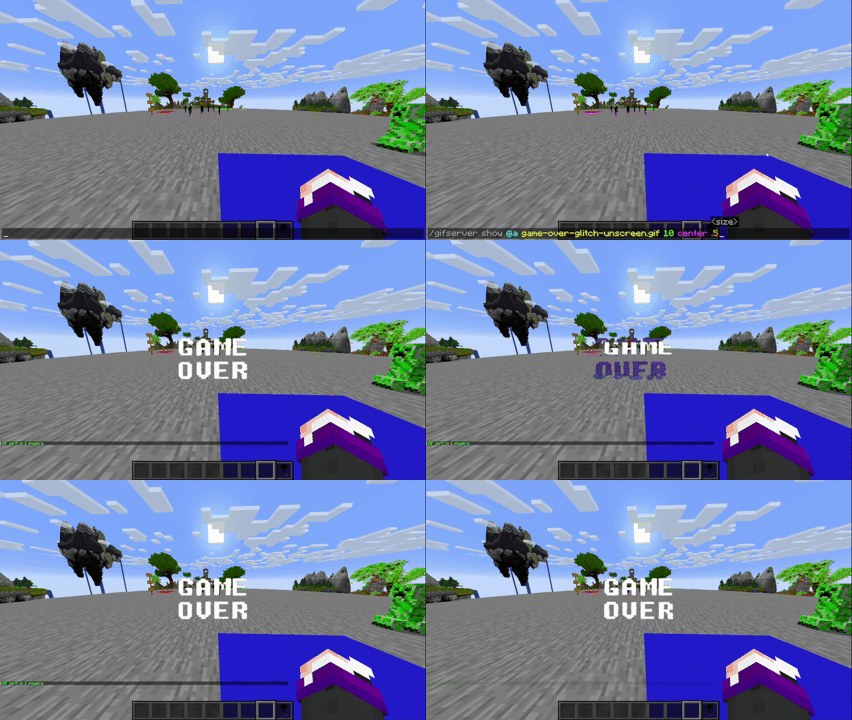
    Server

  • GIF, PNG, JPG or JPEG sent to players (plugin):
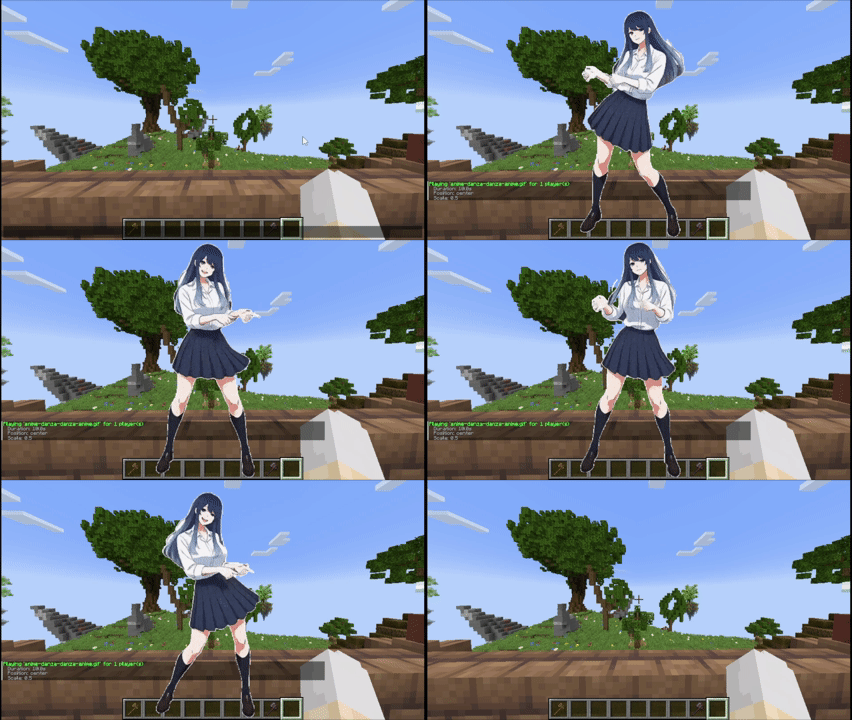
    plugin


Tutorial

Placing files (Client and server)

Client folder: .minecraft/config/animatedframes/media/

Server folder with the mod: config/animatedframes/media/

Server folder with the plugin: plugins/AnimatedFramesPL/media/

Steps:

  1. Copy your GIF, PNG, JPG, JPEG or MP4 file into the appropriate media folder:
    • Client folder for /mediac show or /medias showlocal.
    • Server folder for /medias show.
  2. Make sure the file has the correct extension (.gif, .png, .jpg, .jpeg, .mp4).
  3. Display it in-game:
    • Local (only you): /mediac show sunny.gif 10 center 1.0 80
    • Send a server file to others: /medias show @a sunny.gif 15 center 1.0 80
    • Play files already installed on players' clients: /medias showlocal @a sunny.gif 15 center 1.0 80

Notes:

  • /mediac show → only visible to you
  • /medias show → transfers a server file to selected players — they need the mod and WaterMedia, but not the file beforehand
  • /medias showlocal → uses each player's local file — they need the mod, WaterMedia and the file in their client folder
  • Updating from 1.6.2: replace /medias show with /medias showlocal if you want to keep using files already installed on players' computers
  • Filenames with spaces must use double quotes: /medias show @a "welcome video.mp4" 10 center 1.0 80
  • Large files may take some time to transfer before playback begins
  • Check chat or logs if a file fails to load
  • Use /mediac list to see your local files and /medias list to see server files
  • Duration is measured in seconds; 0 means no command-imposed time limit. Videos still stop when they reach the end
  • Scale range: 0.05–10 (default: 1.0)
  • Volume range: 0–100 (default: 80)
  • Media stops automatically when you disconnect

Available positions (10 options)

center topleft topright bottomleft bottomright topcenter bottomcenter leftcenter rightcenter fullscreen

fullscreen — fills the entire screen for videos while maintaining their aspect ratio, cropping the edges when necessary. Omit the scale and enter the volume directly after fullscreen. Example: /medias show @a intro.mp4 0 fullscreen 80


Credits


Галерея

Oficial Banner

Последние версии

Все версии →
release

Animated Frames 1.7

1.7
26 сент. 2026 г.77Minecraft: 1.21.11fabric
Скачать
Что нового
AnimatedFrames — v1.7 New options for sharing files from the server and improvements to memory management and connectivity. --- ## New Features - **Files from the server:** `/medias show` now sends content to players for playback, without requiring them to copy it to their computers beforehand. This brings back a feature that was already available in AnimatedFrames 1.3.1. - **Local playback:** new `/medias showlocal` command to display files the player already has saved, preserving the previous behavior of `/medias show`. - **Server file listing:** `/medias list` lets you view the files available on the server. - **Names with spaces:** commands accept filenames in quotes, such as `"welcome video.mp4"`. Autocomplete adds the quotes automatically. ## Improvements - Optimized file transfers with background reading. - Separate cache for content received from the server. - File integrity checks before playback. - Better memory management for images and GIFs, freeing resources that are no longer in use. ## Fixes - Fixed playback instances accumulating when switching videos, which could cause unexpected game crashes. - Fixed an issue that prevented commands from running through command blocks and datapack functions to automate multimedia content. Thanks to **melmi_melmi** for reporting it on Discord. --- ## Key Commands | Command | Function | | --- | --- | | `/medias show <player\|@a> <file> [time] [position] [scale] [volume]` | Sends and plays a file from the server. | | `/medias showlocal <player\|@a> <file> [time] [position] [scale] [volume]` | Plays a local file stored on the player's computer. | | `/medias list` | Lists the files on the server. | | `/medias stop <player\|@a>` | Stops playback. | > **When updating from 1.6.2:** if your commands used files stored on each player's PC, replace `/medias show` with `/medias showlocal` to preserve that behavior.
release

Animated Frames 1.4

1.4
7 сент. 2026 г.197Minecraft: 1.20.1, 1.21, 1.21.1, 1.21.4bukkit, paper, purpur, spigot
Скачать
Что нового
# AnimatedFrames Plugin — v1.4 Requires AnimatedFrames mod v1.7 to function. ## New Commands - `/medias show <player|@a> <file> [time] [position] [scale] [volume]` — Sends and plays a file from the server. - `/medias showlocal <player|@a> <file> [time] [position] [scale] [volume]` — Plays a local file stored on the player’s computer. - `/medias list` — Lists the files available on the server. ## Improvements - Improved server file transfers and cache management. - Improved memory management for images and GIFs. ## Fixes - Fixed playback instances accumulating when switching videos. - Fixed command execution from command blocks and datapack functions.
release

Animated Frames 1.7

1.7
6 сент. 2026 г.32Minecraft: 1.21.4fabric
Скачать
Что нового
AnimatedFrames — v1.7 New options for sharing files from the server and improvements to memory management and connectivity. --- ## New Features - **Files from the server:** `/medias show` now sends content to players for playback, without requiring them to copy it to their computers beforehand. This brings back a feature that was already available in AnimatedFrames 1.3.1. - **Local playback:** new `/medias showlocal` command to display files the player already has saved, preserving the previous behavior of `/medias show`. - **Server file listing:** `/medias list` lets you view the files available on the server. - **Names with spaces:** commands accept filenames in quotes, such as `"welcome video.mp4"`. Autocomplete adds the quotes automatically. ## Improvements - Optimized file transfers with background reading. - Separate cache for content received from the server. - File integrity checks before playback. - Better memory management for images and GIFs, freeing resources that are no longer in use. ## Fixes - Fixed playback instances accumulating when switching videos, which could cause unexpected game crashes. - Fixed an issue that prevented commands from running through command blocks and datapack functions to automate multimedia content. Thanks to **melmi_melmi** for reporting it on Discord. --- ## Key Commands | Command | Function | | --- | --- | | `/medias show <player\|@a> <file> [time] [position] [scale] [volume]` | Sends and plays a file from the server. | | `/medias showlocal <player\|@a> <file> [time] [position] [scale] [volume]` | Plays a local file stored on the player's computer. | | `/medias list` | Lists the files on the server. | | `/medias stop <player\|@a>` | Stops playback. | > **When updating from 1.6.2:** if your commands used files stored on each player's PC, replace `/medias show` with `/medias showlocal` to preserve that behavior.
release

Animated Frames 1.7

1.7
6 сент. 2026 г.19Minecraft: 1.21.4neoforge
Скачать
Что нового
AnimatedFrames — v1.7 New options for sharing files from the server and improvements to memory management and connectivity. --- ## New Features - **Files from the server:** `/medias show` now sends content to players for playback, without requiring them to copy it to their computers beforehand. This brings back a feature that was already available in AnimatedFrames 1.3.1. - **Local playback:** new `/medias showlocal` command to display files the player already has saved, preserving the previous behavior of `/medias show`. - **Server file listing:** `/medias list` lets you view the files available on the server. - **Names with spaces:** commands accept filenames in quotes, such as `"welcome video.mp4"`. Autocomplete adds the quotes automatically. ## Improvements - Optimized file transfers with background reading. - Separate cache for content received from the server. - File integrity checks before playback. - Better memory management for images and GIFs, freeing resources that are no longer in use. ## Fixes - Fixed playback instances accumulating when switching videos, which could cause unexpected game crashes. - Fixed an issue that prevented commands from running through command blocks and datapack functions to automate multimedia content. Thanks to **melmi_melmi** for reporting it on Discord. --- ## Key Commands | Command | Function | | --- | --- | | `/medias show <player\|@a> <file> [time] [position] [scale] [volume]` | Sends and plays a file from the server. | | `/medias showlocal <player\|@a> <file> [time] [position] [scale] [volume]` | Plays a local file stored on the player's computer. | | `/medias list` | Lists the files on the server. | | `/medias stop <player\|@a>` | Stops playback. | > **When updating from 1.6.2:** if your commands used files stored on each player's PC, replace `/medias show` with `/medias showlocal` to preserve that behavior.
release

Animated Frames 1.7

1.7
6 сент. 2026 г.131Minecraft: 1.21, 1.21.1fabric
Скачать
Что нового
AnimatedFrames — v1.7 New options for sharing files from the server and improvements to memory management and connectivity. --- ## New Features - **Files from the server:** `/medias show` now sends content to players for playback, without requiring them to copy it to their computers beforehand. This brings back a feature that was already available in AnimatedFrames 1.3.1. - **Local playback:** new `/medias showlocal` command to display files the player already has saved, preserving the previous behavior of `/medias show`. - **Server file listing:** `/medias list` lets you view the files available on the server. - **Names with spaces:** commands accept filenames in quotes, such as `"welcome video.mp4"`. Autocomplete adds the quotes automatically. ## Improvements - Optimized file transfers with background reading. - Separate cache for content received from the server. - File integrity checks before playback. - Better memory management for images and GIFs, freeing resources that are no longer in use. ## Fixes - Fixed playback instances accumulating when switching videos, which could cause unexpected game crashes. - Fixed an issue that prevented commands from running through command blocks and datapack functions to automate multimedia content. Thanks to **melmi_melmi** for reporting it on Discord. --- ## Key Commands | Command | Function | | --- | --- | | `/medias show <player\|@a> <file> [time] [position] [scale] [volume]` | Sends and plays a file from the server. | | `/medias showlocal <player\|@a> <file> [time] [position] [scale] [volume]` | Plays a local file stored on the player's computer. | | `/medias list` | Lists the files on the server. | | `/medias stop <player\|@a>` | Stops playback. | > **When updating from 1.6.2:** if your commands used files stored on each player's PC, replace `/medias show` with `/medias showlocal` to preserve that behavior.
release

Animated Frames 1.7

1.7
6 сент. 2026 г.92Minecraft: 1.21, 1.21.1neoforge
Скачать
Что нового
AnimatedFrames — v1.7 New options for sharing files from the server and improvements to memory management and connectivity. --- ## New Features - **Files from the server:** `/medias show` now sends content to players for playback, without requiring them to copy it to their computers beforehand. This brings back a feature that was already available in AnimatedFrames 1.3.1. - **Local playback:** new `/medias showlocal` command to display files the player already has saved, preserving the previous behavior of `/medias show`. - **Server file listing:** `/medias list` lets you view the files available on the server. - **Names with spaces:** commands accept filenames in quotes, such as `"welcome video.mp4"`. Autocomplete adds the quotes automatically. ## Improvements - Optimized file transfers with background reading. - Separate cache for content received from the server. - File integrity checks before playback. - Better memory management for images and GIFs, freeing resources that are no longer in use. ## Fixes - Fixed playback instances accumulating when switching videos, which could cause unexpected game crashes. - Fixed an issue that prevented commands from running through command blocks and datapack functions to automate multimedia content. Thanks to **melmi_melmi** for reporting it on Discord. --- ## Key Commands | Command | Function | | --- | --- | | `/medias show <player\|@a> <file> [time] [position] [scale] [volume]` | Sends and plays a file from the server. | | `/medias showlocal <player\|@a> <file> [time] [position] [scale] [volume]` | Plays a local file stored on the player's computer. | | `/medias list` | Lists the files on the server. | | `/medias stop <player\|@a>` | Stops playback. | > **When updating from 1.6.2:** if your commands used files stored on each player's PC, replace `/medias show` with `/medias showlocal` to preserve that behavior.
release

AnimatedFrames v1.7

1.7
6 сент. 2026 г.36Minecraft: 1.20.1fabric
Скачать
Что нового
AnimatedFrames — v1.7 New options for sharing files from the server and improvements to memory management and connectivity. --- ## New Features - **Files from the server:** `/medias show` now sends content to players for playback, without requiring them to copy it to their computers beforehand. This brings back a feature that was already available in AnimatedFrames 1.3.1. - **Local playback:** new `/medias showlocal` command to display files the player already has saved, preserving the previous behavior of `/medias show`. - **Server file listing:** `/medias list` lets you view the files available on the server. - **Names with spaces:** commands accept filenames in quotes, such as `"welcome video.mp4"`. Autocomplete adds the quotes automatically. ## Improvements - Optimized file transfers with background reading. - Separate cache for content received from the server. - File integrity checks before playback. - Better memory management for images and GIFs, freeing resources that are no longer in use. ## Fixes - Fixed playback instances accumulating when switching videos, which could cause unexpected game crashes. - Fixed an issue that prevented commands from running through command blocks and datapack functions to automate multimedia content. Thanks to **melmi_melmi** for reporting it on Discord. --- ## Key Commands | Command | Function | | --- | --- | | `/medias show <player\|@a> <file> [time] [position] [scale] [volume]` | Sends and plays a file from the server. | | `/medias showlocal <player\|@a> <file> [time] [position] [scale] [volume]` | Plays a local file stored on the player's computer. | | `/medias list` | Lists the files on the server. | | `/medias stop <player\|@a>` | Stops playback. | > **When updating from 1.6.2:** if your commands used files stored on each player's PC, replace `/medias show` with `/medias showlocal` to preserve that behavior.
release

Animated Frames 1.7

1.7
6 сент. 2026 г.271Minecraft: 1.20.1forge
Скачать
Что нового
AnimatedFrames — v1.7 New options for sharing files from the server and improvements to memory management and connectivity. --- ## New Features - **Files from the server:** `/medias show` now sends content to players for playback, without requiring them to copy it to their computers beforehand. This brings back a feature that was already available in AnimatedFrames 1.3.1. - **Local playback:** new `/medias showlocal` command to display files the player already has saved, preserving the previous behavior of `/medias show`. - **Server file listing:** `/medias list` lets you view the files available on the server. - **Names with spaces:** commands accept filenames in quotes, such as `"welcome video.mp4"`. Autocomplete adds the quotes automatically. ## Improvements - Optimized file transfers with background reading. - Separate cache for content received from the server. - File integrity checks before playback. - Better memory management for images and GIFs, freeing resources that are no longer in use. ## Fixes - Fixed playback instances accumulating when switching videos, which could cause unexpected game crashes. - Fixed an issue that prevented commands from running through command blocks and datapack functions to automate multimedia content. Thanks to **melmi_melmi** for reporting it on Discord. --- ## Key Commands | Command | Function | | --- | --- | | `/medias show <player\|@a> <file> [time] [position] [scale] [volume]` | Sends and plays a file from the server. | | `/medias showlocal <player\|@a> <file> [time] [position] [scale] [volume]` | Plays a local file stored on the player's computer. | | `/medias list` | Lists the files on the server. | | `/medias stop <player\|@a>` | Stops playback. | > **When updating from 1.6.2:** if your commands used files stored on each player's PC, replace `/medias show` with `/medias showlocal` to preserve that behavior.
release

Animated Frames 1.6.2

1.6.2
22 мар. 2026 г.295Minecraft: 1.21.4fabric
Скачать
Что нового
![Banner](https://i.postimg.cc/TwDf1sLg/Animated-Frames-Baner-fabric.png) # AnimatedFrames — v1.6.2 🧵 Fabric | 🎮 Compatible with Minecraft 1.21.4 --- ## ✨ What's new in v1.6.2 - 🆕 **New**: Multiple media can now play simultaneously at different screen positions - 🔧 **Change**: Media size now automatically adapts to the client's GUI Scale, keeping correct proportions at any resolution - 🔧 **Change**: Internal refactor of rendering and resource management code for improved stability --- ## 💬 Commands **Client** - `/mediac show <file> [time] [position] [scale] [volume]` - `/mediac stop` - `/mediac list` - `/mediac lang <en|es>` **Server** - `/medias show <player|@a> <file> [time] [position] [scale] [volume]` - `/medias stop <player|@a>` - `/medias check [player]` - `/medias status` - `/medias debug` --- ## 🌟 Features - 🖼️ Display `.gif`, `.png`, `.jpg`, `.jpeg`, `.mp4` on players' screens - 🎞️ Play multiple media simultaneously at different positions - 🎯 Selector support (`@a`, player name) - 🎛️ Control duration, position, scale, and volume per command - 📐 Media size auto-adapts to client GUI Scale - 📍 10 screen positions: `center` `topleft` `topright` `bottomleft` `bottomright` `topcenter` `bottomcenter` `leftcenter` `rightcenter` `full
release

Animated Frames 1.6.2

1.6.2
22 мар. 2026 г.40Minecraft: 1.21.4neoforge
Скачать
Что нового
![Banner](https://i.postimg.cc/qRjXt1Ps/Animated-Frames-Baner-neoforge.png) # AnimatedFrames — v1.6.2 # 🧵 NeoForge | 🎮 Compatible with Minecraft 1.21.4 --- ## ✨ What's new in v1.6.2 - 🆕 **New**: Multiple media can now play simultaneously at different screen positions - 🔧 **Change**: Media size now automatically adapts to the client's GUI Scale, keeping correct proportions at any resolution - 🔧 **Change**: Internal refactor of rendering and resource management code for improved stability --- ## 💬 Commands **Client** - `/mediac show <file> [time] [position] [scale] [volume]` - `/mediac stop` - `/mediac list` - `/mediac lang <en|es>` **Server** - `/medias show <player|@a> <file> [time] [position] [scale] [volume]` - `/medias stop <player|@a>` - `/medias check [player]` - `/medias status` - `/medias debug` --- ## 🌟 Features - 🖼️ Display `.gif`, `.png`, `.jpg`, `.jpeg`, `.mp4` on players' screens - 🎞️ Play multiple media simultaneously at different positions - 🎯 Selector support (`@a`, player name) - 🎛️ Control duration, position, scale, and volume per command - 📐 Media size auto-adapts to client GUI Scale - 📍 10 screen positions: `center` `topleft` `topright` `bottomleft` `bottomright` `topcenter` `bottomcenter` `leftcenter` `rightcenter` `full