All The Furniture!
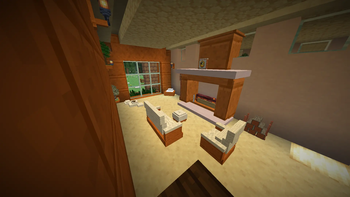
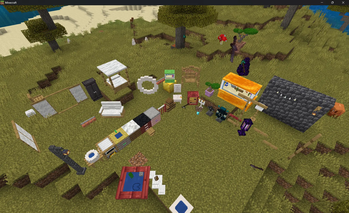
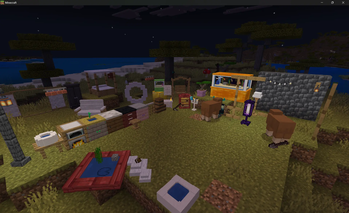
All The Furniture for Minecraft! A Datapack that adds a near Infinite amount of customizable furniture options!
Описание
We have added compatability with Geyser Servers! Instructions on installation are below!
Please! If you have any builds or ideas you have created with the Datapack please feel free to send them to my server on discord! I would love to see what others have built with the datapack! Maybe even planning on doing contests in the future...
All The Furniture!
247 pieces of furniture you can actually arrange. Place it, turn it, restyle it, tilt it, scale it, stack things on it, then pick it back up with every setting remembered.
Available for Minecraft: Java Edition as a data pack and for Bedrock Edition as an add-on. Same furniture, same controls, same features on both. A System Inside of Forevercraft the Datapack!
Getting started
First, craft the Furnishing Catalogue. It's just one Book and one Log of any kind. This is the shop, and everything comes from here.
Open it, pick a shelf, pick a piece. In Survival each piece lists what it costs and takes those materials from your inventory when you choose it. Woods are priced as a family, so any six logs pay a six-log price and they don't have to match. In Creative everything is free and every piece is shown.
Place the piece down, then sneak and right-click it to open the Manage menu.
The one thing to remember: Right-click means use it. Sit on a chair, open a cabinet. Sneak + right-click means manage it. That opens the menu described below.
The Manage menu
Buttons only show up on pieces that can actually do that thing, so no piece will ever show all of these at once.
Placing and aiming
Rotate 45° turns the piece one step. Eight steps takes you all the way around. Face opens a compass. Pick N, NE, E, SE, S, SW, W or NW and the piece turns to face that way outright. Mirror flips the whole piece left to right, which is handy for making a matching pair. Scale + and Scale − resize the piece in quarter steps. Raise ½ and Lower ½ float it up or down half a block at a time, up to 4 up and 6 down. Nudge is for fine positioning. It shifts the piece a small step in any direction. (Bedrock only)
Look and finish
Material re-skins the whole piece. Most pieces can walk through all 355 blocks in the game. The woods or stones the piece is naturally made of come first, then everything else. Transform does the same thing but one element at a time, so you can change a table's top without touching its legs. Paper / Cloth shows up on shoji and screens. Cloth is opaque, Paper lets light glow through. Dressing hides the topper items a piece may come dressed with, leaving you the bare furniture. Reset puts every setting back to default.
Shape and motion
Height switches between Short (1 block tall) and Full (3 blocks tall). Thin / Wide gives you the narrow or wide version of the same piece. Length sets how far curtains and hangings fall: Short, Long or all the way to the Floor. Flip and Hinge flip just the moving part, like which way a door swings or which way a panel slides. Tilt pitches the piece forward or back through 8 stops of 45°. The roll buttons cartwheel it sideways, also 8 stops of 45°. Solid / Walk Through: Solid bolts the piece down so you can stand on it and it blocks you. Walk Through makes it decorative again. A bolted piece can't be tilted and a tilted piece can't be bolted.
Pieces that hold things
Display slots: shelves, cases, racks and plinths hold real items. Right-click with something in hand to place it and the piece draws the actual item. (Java only) Rotate and Spin turn a displayed item or set it spinning on its plinth. Reskin on gear pipes cycles the metal. Facade dresses a pipe in whatever block you're holding. Vertical stands a pipe upright or lays it flat. Tool / Material on the tool rack lets you pick Sword, Pickaxe, Axe, Shovel or Hoe, and the tier it's made from.
Fire and light
Emblaze / Snuffed lights or puts out fireplaces, braziers, fire pits, candles and lanterns. Lit pieces give off real light. Smoke sets whether a lit piece smokes.
Figurines
Collectible creature figurines you can pose on a shelf or plinth.
Wake: figurines are asleep by default. Awake turns their AI back on and lets them wander. This comes with some potential dangers, so be wary... (Java only) Look picks the variant, like the cat breeds or the axolotl colours. Baby switches between adult and baby. Pose gives you Standing, Sitting, Sleeping, Crouched or Rolled up. Effect adds a particle aura. Soul embers and ten others. Stand shows or hides the little plinth it sits on.
Moving and removing
Pick Up returns the piece to your inventory with every setting remembered: material, tilt, scale, all of it. Put it down later and it's exactly how you left it. Move lets you aim where you want it and right-click to set it down there. Replace: hold a different furnishing and swap it in where this one stands. Remove deletes the piece. (Bedrock only)
Sitting and resting
Right-click a chair, sofa, bench, stool, cushion, hammock or bed to sit. Sneak to stand back up.
Sitting is restful, so you slowly heal while seated. Beds work as seats by day and for sleep by night. If enough of the players online are resting, the night passes.
A few notes
Survival-friendly. Everything is crafted from ordinary materials through the Catalogue. Nothing here is creative-only except the figurines and a few pieces the world hands out as treasure.
No commands needed. Every control is in the menu.
Works alongside other packs. Furniture is its own entity and doesn't replace vanilla blocks.
Thank you for checking out our pack! If you have any furniture ideas, feel free to DM me or leave a comment with your recommendations and I'll consider adding them. I'll also credit you for your idea right here on this page.
How to Install Forevercraft Furnishings for Geyser!
This guide is for a Java server that lets Bedrock players join through GeyserMC. Set it up once, and players on both editions see the same furniture in the same world.
Playing Java only? Do Step 1 and skip the rest.
What You Need A Minecraft Java Edition 26.3 server. Forevercraft-Furnishings-Java-1.1.1-26.3.zip: the datapack. It's the furniture itself. Forevercraft-Furnishings-for-Geyser-1.0.0.zip: the Bedrock pack. It makes the furniture visible to Bedrock players. GeyserMC on the server: Standalone, plugin, or mod. Floodgate is optional but makes setup easier (see Step 3). Already running the full Forevercraft datapack? It includes Furnishings, so skip the Furnishings zip in Step 1. Use one or the other, never both.
Step 1: Install the Datapack (Java) Stop the server. Put Forevercraft-Furnishings-Java-1.1.1-26.3.zip in your world's datapacks folder, for example world/datapacks/. Don't unzip it. Start the server. Java players need nothing else: no resource pack and no mods.
To get started, craft the Furnishing Catalogue (a book and any log) and right-click it to browse and craft furniture.
Step 2: Install the Geyser Pack (Bedrock)
Unzip Forevercraft-Furnishings-for-Geyser-1.0.0.zip somewhere handy. Inside are two folders: packs/ and custom_mappings/.
Open Geyser's folder:
Standalone: the folder next to Geyser.jar
Spigot / Paper plugin: plugins/Geyser-Spigot/
Fabric mod: config/Geyser-Fabric/
NeoForge mod: config/Geyser-NeoForge/
Copy packs/ and custom_mappings/ into it. If those folders already exist, merge them; don't replace them.
Open Geyser's config.yml and set: enable-custom-content: true In newer Geyser configs, this setting is under gameplay:.
Restart Geyser. With the plugin or mod, restart the whole server.
Step 3: Turn It On
With Floodgate: nothing to do. It turns on by itself the first time a Bedrock player joins.
Without Floodgate (Standalone without it, offline mode, or linked accounts): an operator runs this once: /function evercraft:decor/geyser/on
Without Floodgate the server can't tell who's on Bedrock, so Bedrock players also need the button menu switched on (see below). An operator runs this once per player: /execute as <player> run function evercraft:decor/geyser/menu/toggle
Joining Bedrock players get a prompt on join to download the resource pack (about 5.6 MB). They need to accept it. Once it's downloaded, every piece of furniture shows up with the woods, colours, sizes, and facing that Java players see.
Using the Furniture on Bedrock The floating menu Java players use doesn't show on Bedrock, so Bedrock players get a button menu instead:
Open it: crouch and use a piece: right-click, the left trigger on a controller, or tap on a touch screen. What's in it: every button from the Java menu. Facing (a compass page), Turn, Tilt, Roll, Raise, Lower, Bigger, Smaller, the piece's own choices (Wood, Colour, Hinge, Pose, and so on), Transform, Tangible, Glow, Clicks, Move, Replace, Reset, and Pick Up. The Catalogue: the Furnishing Catalogue book and the Sawmill open as a button menu too. Pick a wing, then a piece to see its cost, then press Craft (or Draft, with 9 of its Ideas). The page tells you if it worked. Each press shows a "Triggered [Button]" line in chat. That's normal.
Галерея