AliCushions
Enjoy the new Minecraft Cushions on 1.19.4+
Описание





AliCushions — Upcoming Minecraft Cushions for 1.19.4+
Bring Minecraft's upcoming Cushions to your server on 1.19.4+.
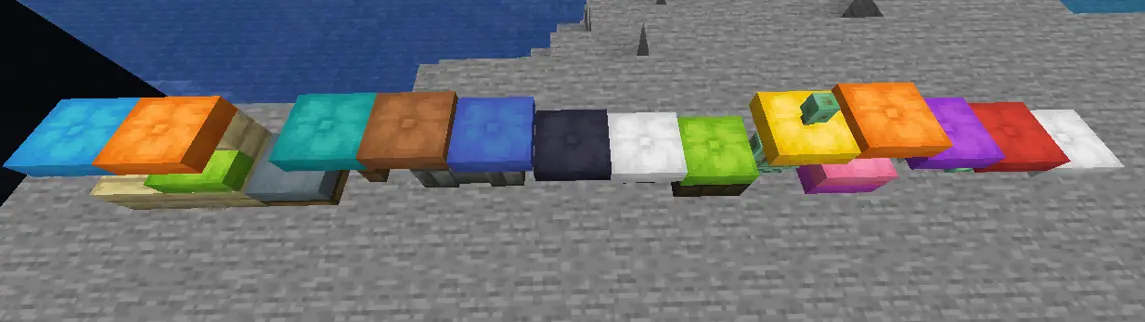
AliCushions faithfully recreates the new vanilla Cushions announced by Mojang, allowing players to decorate and sit comfortably before they officially arrive in your version.
Unlike the upcoming vanilla cushions, placed cushions won't disappear automatically, making them perfect for permanent decorations, houses, cafés, bedrooms, roleplay servers and much more.
All 16 vanilla colors are included, and future updates will add new colors and themed cushion collections.
Features
- 🪑 Faithful recreation of Minecraft's upcoming Cushions.
- 🎨 Includes all 16 vanilla dye colors.
- 🏡 Permanent cushions that don't disappear automatically.
- 🔒 Ownership protection.
- ⚙️ Fully configurable crafting recipes.
- 📦 Lightweight and easy to use.
- ✅ Supports Minecraft 1.19.4+.
Commands
Give cushions
/alicushions give [player] <type>
[player](optional) — Give a cushion to another player.<type>(required) — Cushion color/type.
Examples:
/alicushions give pink
/alicushions give Steve blue
Permissions
| Permission | Description |
|---|---|
alicushions.give | Allows giving cushions to yourself. |
alicushions.give.others | Allows giving cushions to other players. |
alicushions.admin | Allows breaking cushions owned by other players. |
Players can always break their own cushions.
Operators or players with alicushions.admin can remove any cushion.
Configurable Recipes
Every cushion recipe can be customized.
Supported recipe types:
- ROW
- SHAPED
- SHAPELESS
Shapeless
recipe:
  type: "shapeless"
  amount: 1
  ingredients:
    - "wool"
    - "wool"
    - "wool"
Shaped
recipe:
  type: "shaped"
  amount: 1
  shape:
    - "AAA"
    - "ABA"
    - "AAA"
  keys:
    A: "wool"
    B: "string"
Row
blue:
name: "C44AACojín azul"
material: "blue_dye"
color: "blue"
recipe:
type: "row"
ingredient: "blue_wool"
amount: 1
Support the creator ❤️
If you want to support my work you can use the creator code:
favio
when purchasing Hytale or in the future store.
Thank you!
Installation
Simply place the plugin inside your server's plugins folder and restart the server.
That's it!

Upcoming Features / Planned Updates
The following features are planned for future updates:
- 🌈 More cushion colors.
- 🎄 Seasonal and themed cushion collections.
- 🛏️ Additional customization options.
Some images