Advanced Whitelist
Like a normal whitelist, but with powerful extra features to improve your Minecraft server experience.
Описание
Advanced Whitelist
Like a normal whitelist, but with powerful extra features to improve your Minecraft server experience. Players can send join requests directly when trying to connect, making access management easier and more interactive.
Administrators can review and accept requests instantly, keeping full control while reducing manual effort. The plugin also includes Discord whitelist management, request reasons, and protocol logging for important whitelist actions.
Advanced Features
 Request System
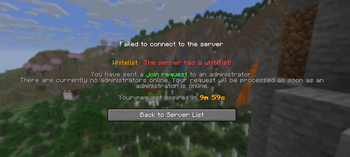
Players send a join request to an administrator on the server when they try to join.
If an administrator is online, the request is sent directly in chat as an interactive message, where it can be accepted immediately.
If no administrator is online, the request is stored for a configurable amount of time and can later be reviewed with /whitelist requests.
Requests can contain a reason, which is shown in the request overview and in the interactive request messages.

 Discord Integration
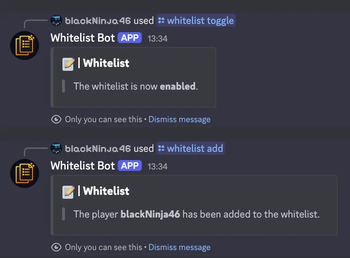
Users can add a Discord bot using a token to manage the whitelist directly from their Discord server.
The Discord integration includes:
- Slash commands for whitelist management
- A
/requestmodal where users can submit a request with a reason - Optional role-based access for Discord whitelist commands
- Optional role requirements for using the request modal
- Protocol logging to a configurable Discord channel for whitelist changes

Commands
| Command | Permission | Description |
|---|---|---|
/whitelist <add/remove> <player> | advancedwhitelist.player | Add or remove a player from the whitelist |
/whitelist list | advancedwhitelist.list | Show all whitelisted players |
/whitelist toggle/on/off | advancedwhitelist.toggle | Enable or disable the whitelist |
/whitelist set | advancedwhitelist.player | Clear the current list and add all online players |
/whitelist requests | advancedwhitelist.requests | Show all pending join requests including reason and expiration |
/whitelist reload | advancedwhitelist.reload | Reload the plugin configuration |
Discord Slash Commands
| Command | Description |
|---|---|
/whitelist toggle | Enable or disable the whitelist |
/whitelist add | Add a player to the whitelist |
/whitelist remove | Remove a player from the whitelist |
/whitelist list | Show all whitelisted players |
/whitelist requests | Show pending whitelist requests |
/whitelist info | Show details for a specific request |
/request | Open the request modal and submit a reason |
Permissions
advancedwhitelist.admin→ Permission to manage all featuresadvancedwhitelist.request.notify→ Permission to receive join requests in chatadvancedwhitelist.toggle→ Permission to enable or disable the whitelistadvancedwhitelist.player→ Permission to add or remove playersadvancedwhitelist.list→ Permission to list whitelisted playersadvancedwhitelist.requests→ Permission to view pending requestsadvancedwhitelist.reload→ Permission to reload the configuration
Configuration
| Value | Description | Default |
|---|---|---|
Language | Change the plugin language (supported: English, German) | en |
RequestsExpiration | Time in minutes until a join request expires | 10 |
Discord Bot Configuration
| Value | Description | Default |
|---|---|---|
Discord-Bot.Enabled | Change whether the Discord bot should be used | false |
Discord-Bot.Token | Token for the Discord bot (required if enabled) | Empty |
Discord-Bot.Permissions.UseAdmin | Require Discord administrator permission for whitelist commands | true |
Discord-Bot.Permissions.UseRoleId | Role ID used instead of administrator permission | 0 |
Discord-Bot.Protocol.ChannelId | Discord channel ID for protocol and whitelist log messages | 0 |
Discord-Bot.Model.Request.MinChars | Minimum length for a request reason | 30 |
Discord-Bot.Model.Request.MaxChars | Maximum length for a request reason | 200 |
Discord-Bot.Model.Request.RequiredRole | Require a specific role to use /request | false |
Discord-Bot.Model.Request.RoleId | Role ID required to use /request | 0 |
How to Create and Set Up a Discord Bot
Create a Discord Application
- Go to the Discord Developer Portal
https://discord.com/developers/applications - Click New Application.
- Enter a name for your bot (e.g.
Advanced Whitelist). - Click Create.
Create the Bot User
- Open Bot in the left menu.
- Click Add Bot and confirm.
- (Optional) Upload a bot icon and change the username.
- Enable the following Privileged Gateway Intents:
- Presence Intent
- Server Members Intent
- Message Content Intent
- Click Save Changes.
These intents are required if your bot reads messages or processes commands.
Copy the Bot Token
- In the Bot section, click Reset Token.
- Copy the generated token.
- Store it securely and never share it publicly.
The token is the password for your bot.
Invite the Bot to a Discord Server
- Go to OAuth2 → URL Generator.
- Select the scopes
botandapplications.commands. - Choose one of the following permissions:
- Administrator (recommended)
- or only the permissions your bot needs
- Copy the generated URL.
- Open it in your browser and authorize the bot.
You need the Manage Server permission.
Insert the Token into the Config File
Example: config.yml
Discord-Bot:
  Enabled: true
  Token: "YOUR_BOT_TOKEN_HERE"
  Permissions:
    UseAdmin: true
    UseRoleId: 0
  Protocol:
    ChannelId: 0
  Model:
    Request:
      MinChars: 30
      MaxChars: 200
      RequiredRole: false
      RoleId: 0
Save the file and restart the server.
Start the Bot
Once the Minecraft server is running, the bot will appear online on your Discord server.
If you need help or want to suggest new features, feel free to join our Discord: -> https://discord.blackninja.live
Галерея