

Additional Enchantments
Adds new enchantments to the game
Автор: Cadentem16,8 тыс.23обновлён 31 авг. 2026 г.
Механики игры
Описание

FAQ
Further enchantments are planned
- Hunter
- Confusion (maybe)
- Voiding (maybe)
- Straight Shot (maybe)
- ...?
General Technical Definitions
New trigger point for enchantment effects
equipment_change_trigger: When changing any equipped item- Most enchantments in this mod apply data attachments to the target entity, which handle the logic
- Meaning it is unlikely that they work well with other trigger points for enchantments
New loot item conditions
entity_typematch_item_entity
Entity Type
Allows broader checks for entities
EntityType (LootItemCondition)
{
  "type": Type,           // [Mandatory] ||
  "entity": EntityTarget  // [Mandatory] || Which entity of the loot context is checked
}
Type
living_entity: Entities that extend theLivingEntityclass (i.e., noMinecarts,Itemsetc.)enemy: Entities that implement theEnemyinterface or are of the mob categoryMONSTERtamed: Entities that extend theTamableAnimalclass and are tamedanimal: Entities that extend theAnimalclassitem: Entities that extend theItemEntityclassexperience_orb: Entities that extend theExperienceOrbclass
EntityTarget
thisattackerdirect_attackerattacking_player
Match Item Entity
Allows using ItemPredicates to check the item of the Item Entity
{
  "predicate": ItemPredicate, // [Optional] || To match the item of the item entity, all are valid if left empty
  "target": EntityTarget      // [Optional] || Which entity of the loot context is checked (Default: 'this')
}
Additional explanations
- ItemPredicate: Check the
predicatedefinition of match_tool
EntityTarget
thisattackerdirect_attackerattacking_player
Enchantments
Fluid Vision
- Improves visibility through fluids from above
- Improves visibility while within the fluids
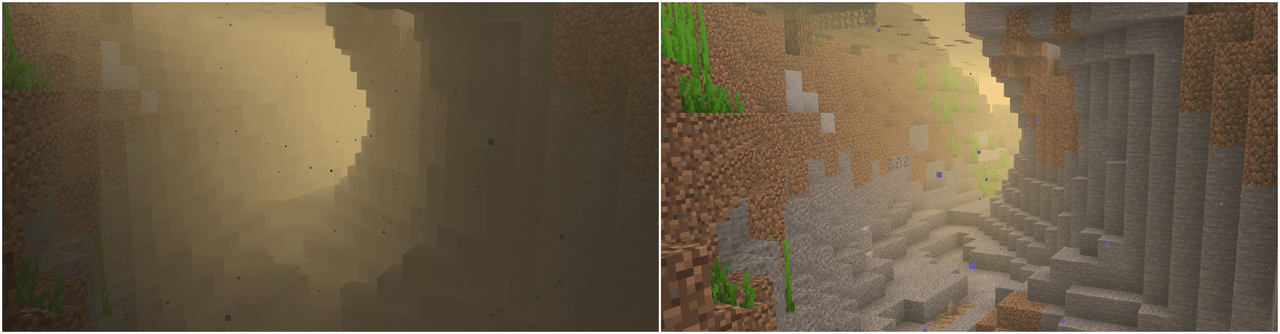
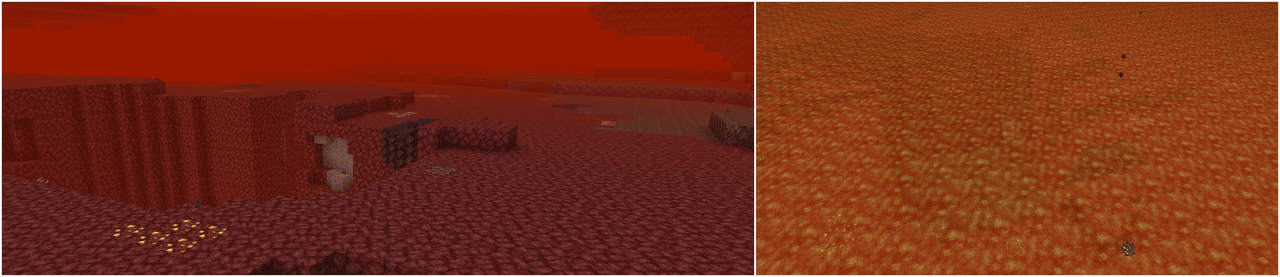
Default Effects
Level 1:
- Improves visibility in water
Level 2:
- Improves visibility in lava
- Improves visibility in
createfluids (#additional_enchantments:createfluid type tag) - Improves visibility in
the_bumblezonefluids (#additional_enchantments:bumblezonefluid type tag) - Better visibility
Level 3:
- Fluids from
Level 1andLevel 2 - Better visibility
Level 4:
- Fluids from
Level 1andLevel 2 - Better visibility
Technical Definition
{
  "vision": {                                     // [Mandatory] ||
    "values": [                                   // [Mandatory] ||
      {
        "level_range": {                          // [Mandatory] || Defines at which enchantment levels this effect will apply
          "min": integer,                         // [Optional]  ||
          "max": integer                          // [Optional]  ||
        },
        "value": [                                // [Mandatory] ||
          {
            "id": ResourceLocation,               // [Mandatory] || Unique identifier for the effect
            "fluid_types": HolderSet<FluidType>,  // [Mandatory] || Defines to which fluids this effect will apply to
            "percentage": LevelBasedValue         // [Mandatory] || Defines how see-through the fluid will be and by how much the viewing distance within the fluid will be improved
          }
        ]
      }
    ]
  }
}
Additional explanations
Homing
- Causes the projectile to home in on targets
- Entities closest to the camera focus are prioritized (i.e., the entity you look at)
- Friendly entities (your tamed animals, allies or their tamed animals, players if pvp is disabled) are ignored
- The target definition with the highest priority is checked first
Default Effects
All Levels:
- Living entities (priority 0)
- Except
minecraft:villager,minecraft:iron_golemandminecraft:enderman
- Except
- Animals (priority 1)
- Enemies (priority 2)
- Except
minecraft:enderman
- Except
- Bosses (priority 3)
#c:bossesandminecraft:warden
Level 2
- Improved search range, velocity and turn angle per tick
Level 3:
- Improved search range, velocity and turn angle per tick
Technical Definition
{
  "homing": {                                       // [Mandatory] ||
    "values": [                                     // [Mandatory] ||
      {
        "level_range": {                            // [Mandatory] || Defines at which enchantment levels this effect will apply
          "min": integer,                           // [Optional]  ||
          "max": integer                            // [Optional]  ||
        },
        "value": [                                  // [Mandatory] ||
          {
            "id": ResourceLocation,                 // [Mandatory] || Unique identifier for the effect
            "projectiles": HolderSet<EntityType>,   // [Optional]  || Projectiles this effect applies to (none specified = all)
            "target_condition": LootItemCondition,  // [Mandatory] || Determines which entities are targeted
            "search_range": {                       // [Mandatory] || Specifies the search range used to pick targets
                "front": LevelBasedValue,           // [Optional]  || (Default: 0)
                "back": LevelBasedValue,            // [Optional]  || (Default: 0)
                "left": LevelBasedValue,            // [Optional]  || (Default: 0)
                "right": LevelBasedValue,           // [Optional]  || (Default: 0)
                "up": LevelBasedValue,              // [Optional]  || (Default: 0)
                "down": LevelBasedValue             // [Optional]  || (Default: 0)
              },
            "velocity_multiplier": LevelBasedValue, // [Mandatory] || A multiplier that is applied per tick to the projectiles velocity
            "max_turn_per_tick": LevelBasedValue,   // [Optional]  || The maximum amount of degrees the projectile can turn per tick (Default: 180, meaning it will snap directly to the target)
            "priority": integer                     // [Optional]  || The priority of this effect (Default: 0)
          }
        ]
      }
    ]
  }
}
Additional explanations
- ResourceLocation
- HolderSet
- LootItemCondition
thisentity relates to the targeted entityoriginrelates to the position of the targeted entityattacking_entityrelates to the owner of the projectiledirect_attacking_entityrelates to the actual projectile
- LevelBasedValue
Perception
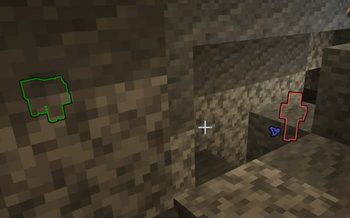
- Displays entities as glowing using custom colors, see below to which entities are affected by default
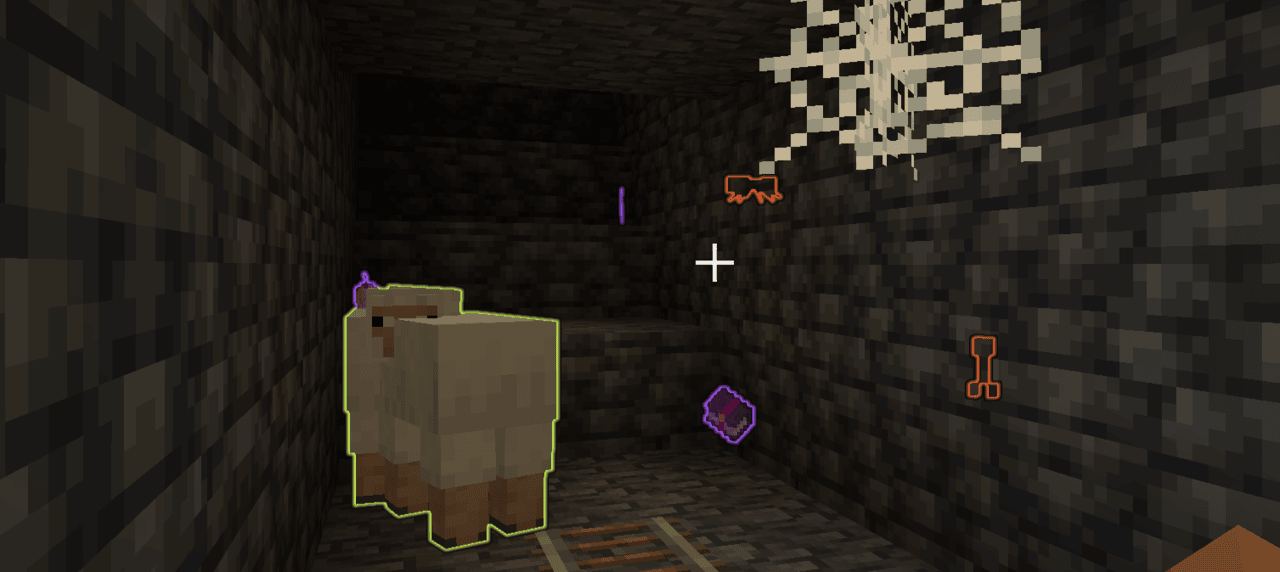
Default Effects
Level 1:
- Highlights valuable items (
#additional_enchantments:valuablesitem tag) - Highlights enchanted items
- Highlights enemies
- Highlights animals
Level 2:
- Highlights valuable items (
#additional_enchantments:valuablesitem tag) - Highlights enchanted items
- Highlights enemies
- Highlights animals
- Highlights bosses
Level 3:
- Highlights valuable items in a limited form (
#additional_enchantments:limited_valuablesitem tag) - Highlights enchanted books containing useful enchantments (e.g.,
Unbreaking IIorMending) - Highlights enemies
- Highlights animals
- Highlights bosses
Technical Definition
{
  "perception": {                           // [Mandatory] ||
    "values": [                             // [Mandatory] ||
      {
        "level_range": {                    // [Mandatory] || Defines at which enchantment levels this effect will apply
          "min": integer,                   // [Optional]  ||
          "max": integer                    // [Optional]  ||
        },
        "value": [                          // [Mandatory] ||
          {
            "key": ResourceLocation,        // [Mandatory] || Unique identifier for the effect
            "condition": LootItemCondition, // [Mandatory] || Checks which entities this effect will apply to
            "range": LevelBasedValue,       // [Mandatory] || Defines up to which distance the entities will be affected at
            "color": ShiftingColor          // [Mandatory] || The colors of the effect
          }
        ]
      }
    ]
  }
}
ShiftingColor
{
  "colors": [                 // [Mandatory] || The colors defined in here will be smoothly cycled through based on the specified shift rate
    {
      "color": TextColor,     // [Mandatory] ||
      "alpha": float          // [Optional]  || The alpha value of the color (0..1) (Default: 1)
    }
  ],
  "color_shift_rate": double, // [Optional]  || At which speed the colors will be cycled through (Default: 1.0)
  "priority": integer         // [Optional]  || Which color to be picked - the entry with the highest priority will be picked (Default: 0)
}
Additional explanations
- TextColor: Either a named minecraft color or Hex codes
- ResourceLocation
- LootItemCondition
thisentity context relates to the targeted entity that would receive the glow effectoriginrelates to the position of the targeted entity
- LevelBasedValue
Treasure Finder
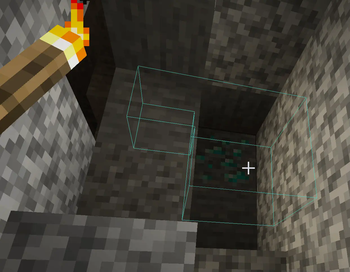
- Will highlight blocks using different ways, see below for more information
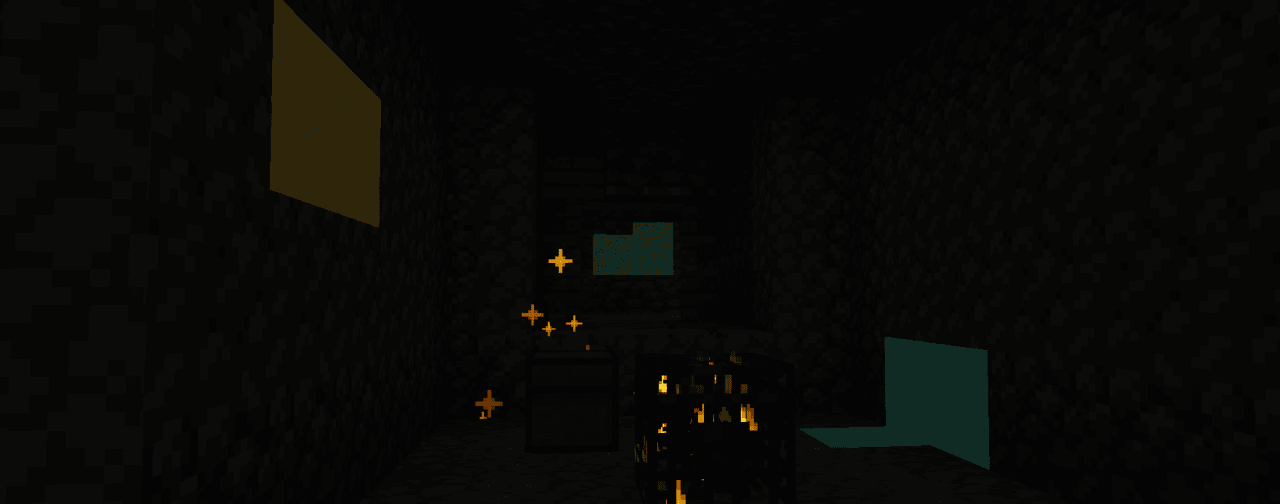
(Compression combined with a still image makes this look worse than it actually is)
Default Effects
All levels:
treasures, using theparticlesdisplay type
Level 1:
- (Uses
simple_shaderfor all ores) - Copper ore
- Iron ore
- Zinc ore
- Silver ore
Level 2:
- (Uses
simple_shaderfor all ores) - Iron ore
- Zinc ore
- Silver ore
- Lapis ore
- Gold ore
Level 3:
- (Uses
simple_shaderfor all ores) - Lapis ore
- Gold ore
- Emerald ore
- Diamond ore
Level 4:
- (Uses
outlinefor all ores) - Emerald ore
- Diamond ore
- Netherite ore
Technical Definition
{
  "vision": {                             // [Mandatory] ||
    "values": [                           // [Mandatory] ||
      {
        "level_range": {                  // [Mandatory] || Defines at which enchantment levels this effect will apply
          "min": integer,                 // [Optional]  ||
          "max": integer                  // [Optional]  ||
        },
        "value": [                        // [Mandatory] ||
          {
            "id": ResourceLocation,       // [Mandatory] || Unique identifier for the effect
            "blocks": BlockDefinition,    // [Mandatory] || Defines to which blocks this effect will apply to
            "range": LevelBasedValue,     // [Mandatory] || Defines up to which distance the blocks will be affected at
            "display_type": DisplayType,  // [Mandatory] || Defines how the effect will be displayed
            "particle_rate": integer,     // [Optional]  || The rate at which particles will be spawned (only applicable to 'particles' display type) (Default: 0)
            "color": ShiftingColor        // [Mandatory] || The colors of the effect
          }
        ]
      }
    ]
  }
}
ShiftingColor
{
  "colors": [                 // [Mandatory] || The colors defined in here will be smoothly cycled through based on the specified shift rate
    {
      "color": TextColor,     // [Mandatory] ||
      "alpha": float          // [Optional]  || The alpha value of the color (0..1) (Default: 1)
    }
  ],
  "color_shift_rate": double, // [Optional]  || At which speed the colors will be cycled through (Default: 1.0)
  "priority": integer         // [Optional]  || Which color to be picked - the entry with the highest priority will be picked (Default: 0)
}
Additional explanations
- BlockDefinition allows either one of these two
treasures: Unopened loot containers (included inadditional_enchantment:treasuresblock tag)- HolderSet of type
Block
- DisplayType
outline: Outline around the block, visible through wallsparticles: Spawns particles at the block positionsimple_shader: A glow effect around the block
- TextColor: Either a named minecraft color or Hex codes
- ResourceLocation
- HolderSet
- LevelBasedValue
Climbing
- Allows climbing on most blocks, no ladder required
- At further levels also disables the automatic sliding down and even allows climbing on ceilings
Default Effects
Level 1:
- Allows climbing if the block matches:
- Is not air
- Is solid
- Is not a fluid
- Is not
#additional_enchantments:slippery(ice / glass)
Level 2:
- Enables sticking to walls
Level 3:
- Enables ceiling climbing
Technical Definition
{
  "climbable": {                            // [Mandatory] ||
    "values": [                             // [Mandatory] ||
      {
        "level_range": {                    // [Mandatory] || Defines at which enchantment levels this effect will apply
          "min": integer,                   // [Optional]  ||
          "max": integer                    // [Optional]  ||
        },
        "value": [                          // [Mandatory] ||
          {
            "key": ResourceLocation,        // [Mandatory] || Unique identifier for the effect
            "blocks": BlockPredicate,       // [Mandatory] || Defines which blocks are climbable
            "can_stick_to_walls": boolean,  // [Optional]  || If enabled the entity will not automatically slide down the wall (press SHIFT to be able to climb downwards)
            "can_climb_ceilings": boolean   // [Optional]  || If enabled the entity will be able to climb along the ceiling
          }
        ]
      }
    ]
  }
}
Additional explanations
Green Foot
- Applies a bonemeal effect on the blocks you walk on and around you
- For saplings and crops the effect will also damage the enchanted item per application
Default Effects
Level 1:
- Any block: Constant 1% chance
#minecraft:saplings: 10% chance, + 7.5% chance per level#minecraft:crops: 30% chance, + 10% chance per level
Level 2:
- Increased range
- Increased probability
Level 3:
- Increased range
- Increased probability
Technical Definition
{
  "growth_entries": [                 // [Mandatory] ||
    {
      "predicate": BlockPredicate,    // [Mandatory] || Checks which block to apply this effect to
      "probability": LevelBasedValue, // [Mandatory] || The chance for this effect to be applied, checked separately before each attempt for every position
      "priority": integer,            // [Optional]  || Which effect to pick if multiple predicates match - the highest priority is selected (Default: 0)
      "damage": integer               // [Mandatory] || The amount the enchanted item will be damaged from each successful effect attempt
    }
  ],
  "extra_range": LevelBasedValue      // [Mandatory] || The extra range (radius) around the player this effect will apply to, in addition to the origin position
}
Additional explanations
Галерея
Последние версии
Все версии →release
Additional Enchantments - 1.21.1 - 2.0.2
2.0.231 авг. 2026 г.256Minecraft: 1.21, 1.21.1neoforge
Что нового
- adjust fog handling for better visibility inside certain fluids like lava
- skip rendering fire overlay if the player is fire immune / in creative mode / has fire resistance effect (only relevant while inside fluids related to the enchantment)
- generally re-apply fog changes in fluids, lost by last update (cancel for event got lost which is needed in < 26.1.2)
release
Additional Enchantments - 26.1.2 - 2.0.1
2.0.131 авг. 2026 г.40Minecraft: 26.1.2neoforge
Что нового
- adjust fog handling for better visibility inside certain fluids like lava
- skip rendering fire overlay if the player is fire immune / in creative mode / has fire resistance effect (only relevant while inside fluids related to the enchantment)
release
Additional Enchantments - 1.21.1 - 2.0.1
2.0.130 авг. 2026 г.23Minecraft: 1.21, 1.21.1neoforge
Что нового
Adjust fluid vision
- better visibility through liquids
- fixed an issue where the fluid fog visibility might get worse with increased (visibility) percentage
release
Additional Enchantments - 26.1.2 - 2.0.0
2.0.030 авг. 2026 г.21Minecraft: 26.1.2neoforge
Что нового
Initial 26.1.2 release
release
Additional Enchantments 1.21.1 - 2.0.0
2.0.029 авг. 2026 г.25Minecraft: 1.21, 1.21.1neoforge
Что нового
Initial 1.21.1 release
See description for enchantments etc.
release
Additional Enchantments 1.20.1 - 1.3.2
1.3.24 мар. 2026 г.998Minecraft: 1.20, 1.20.1forge, neoforge
Что нового
fix treasure finder glow effect rendering
release
Additional Enchantments 1.20.1 - 1.3.1
1.3.117 янв. 2026 г.392Minecraft: 1.20, 1.20.1forge, neoforge
Что нового
fixed a potential crash issue with tipped enchantment (when an effect could no longer be loaded?)
release
Additional Enchantments 1.20.1 - 1.3.0
1.3.017 дек. 2025 г.623Minecraft: 1.20, 1.20.1forge, neoforge
Что нового
Warning: Backup your configs
---
`Ore Sight` has been removed and its functionality merged with `Treasure Finder`
- Existing items with `Ore Sight` should automatically update and switch to `Treasure Finder`

The config has been extended and allows different ways to render per block / enchantment level
The display types are:
- GLOW
- X_RAY_OUTLINE
- PARTICLES
A config entry looks like this:
```toml
[[treasure_finder.entries]]
resource = "#forge:ores/emerald"
from_level = 4
to_level = -1
range = 16.0
color_shift_rate = 1.0
display_type = "X_RAY_OUTLINE"
[[treasure_finder.entries.colors]]
color = "dark_green"
alpha = 0.15
[[treasure_finder.entries.colors]]
color = "green"
alpha = 0.15
[[treasure_finder.entries.colors]]
color = "#55ff88"
alpha = 0.15
```
from- / to level determine to which enchantment level this config applies (-1 meaning that it applies to any higher levels as well)
When multiple color entries exist the display will shift through them at the specified rate
---
Added two config entries for `tipped`
- `tipped_cooldown` (default 0), which prevents new tipped applications until the cooldown has finished
- `tipped_scale_cooldown_with_level`, which (if enabled) increases the cooldown by multiplying it with the enchantment level)
release
Additional Enchantments 1.19.2 - 1.3.0
1.3.017 дек. 2025 г.430Minecraft: 1.19.2forge
Что нового
Warning: Backup your configs
---
`Ore Sight` has been removed and its functionality merged with `Treasure Finder`
- Existing items with `Ore Sight` should automatically update and switch to `Treasure Finder`

The config has been extended and allows different ways to render per block / enchantment level
The display types are:
- GLOW
- X_RAY_OUTLINE
- PARTICLES
A config entry looks like this:
```toml
[[treasure_finder.entries]]
resource = "#forge:ores/emerald"
from_level = 4
to_level = -1
range = 16.0
color_shift_rate = 1.0
display_type = "X_RAY_OUTLINE"
[[treasure_finder.entries.colors]]
color = "dark_green"
alpha = 0.15
[[treasure_finder.entries.colors]]
color = "green"
alpha = 0.15
[[treasure_finder.entries.colors]]
color = "#55ff88"
alpha = 0.15
```
from- / to level determine to which enchantment level this config applies (-1 meaning that it applies to any higher levels as well)
When multiple color entries exist the display will shift through them at the specified rate
---
Added two config entries for `tipped`
- `tipped_cooldown` (default 0), which prevents new tipped applications until the cooldown has finished
- `tipped_scale_cooldown_with_level`, which (if enabled) increases the cooldown by multiplying it with the enchantment level)
release
Additional Enchantments 1.19.2 - 1.2.1
1.2.12 апр. 2025 г.530Minecraft: 1.19.2forge
Что нового
Add changes from 1.20.1 which include:
- Treasure enchantment (similar to ore sight with no x-ray and also marks chests with loot that has not been generated yet)
- Performance improvements for ore sight enchantment (this also replaces the client config with a server config per enchantment level for which blocks to mark)
- Fix to a kill / loot credit issue with the confusion enchantment
Also:
- Fix a crash which would occur at a certain height when the ore sight enchantment was active
- Added russian translation (@AKNAL0GIA from Github)